Accounting PDFs in Go: journal, ledger, and trial balance
Generate a journal, general ledger, and trial balance as PDFs in Go from one slice of entries. Full gpdf code with ruled tables and automatic page breaks.
TL;DR
One slice of journal entries is enough to produce a journal, a general ledger, and a trial balance from the same Go program. With gpdf v1.0.17 the whole main.go is 240 lines. It includes ruled tables, right-aligned amounts, header rows that repeat across page breaks, and 1 / 3 page numbers. No Chromium, no CGO, no reporting-tool license.
A journal for one month (67 entries) is 2 pages and takes about 9 ms on an Apple M1. At 10,000 entries it is 170 pages and takes about 0.7 seconds.
A report is an aggregation, not a table
When someone asks how to produce accounting reports in Go, the first question is usually about drawing grid lines. That is not where the work is.
A journal, a general ledger, and a trial balance look like three different documents, but they come from the same data. The journal lists entries in date order. The general ledger takes the same entries, regroups them by account, and adds a running balance. The trial balance folds each account down to one row. The difference between the three is a different GROUP BY.
So the design is one data type, three aggregation functions, and one rendering function. The rendering function is gpdf's c.Table, and it is thin. This post spends most of its length on the aggregation side for that reason.
It is written for people building accounting, billing, or expense systems in Go who found the words "report output" in the requirements.
The sample uses Japanese bookkeeping: the report names are 仕訳帳 (journal), 総勘定元帳 (general ledger), and 合計残高試算表 (trial balance), and the account names are in Japanese. The structure is the same double-entry bookkeeping used everywhere. Keeping the Japanese text also shows that CJK output needs no special handling beyond registering a font.
The data model: one kind of entry
type Entry struct {
	Date, Debit, Credit, Memo string
	Amount                    int64
}
An entry is a debit account, a credit account, and an amount. The amount is an int64 in whole yen. With float64, the day your trial balance is off by 1 you will spend the night looking for it. In a world where 0.1 + 0.2 is not 0.3, checking that debits equal credits does not work.
Accounts are described by two tables.
var accounts = []string{"現金", "普通預金", "売掛金", "買掛金", "資本金", "売上高", "仕入高", "支払家賃"}

var debitSide = map[string]bool{"現金": true, "普通預金": true, "売掛金": true, "仕入高": true, "支払家賃": true}
accounts is the display order: cash, bank deposits, accounts receivable, accounts payable, capital, sales, purchases, rent. The ledger and the trial balance follow it. debitSide marks the accounts that increase on the debit side, which are assets and expenses. Liabilities, equity, and revenue increase on the credit side. The ledger needs this direction to compute the balance column.
This is a simplification. Real entries are not always one-to-one. A payroll entry has one debit line and three credit lines: bank deposits, income tax withheld, and social insurance withheld. To support compound entries, change Entry to a voucher number plus a slice of lines. The aggregation functions then loop over lines, and the rendering code does not change at all.
The full code
Put NotoSansJP-Regular.ttf in a directory where you ran go mod init, and save this as main.go. Tested with gpdf v1.0.17.
go get github.com/gpdf-dev/gpdfpackage main
import (
"fmt"
"log"
"os"
"sort"
"strconv"
"github.com/gpdf-dev/gpdf/document"
"github.com/gpdf-dev/gpdf/pdf"
"github.com/gpdf-dev/gpdf/template"
)
// Entry is one journal entry. Amounts are whole yen in int64, never float64.
type Entry struct {
Date, Debit, Credit, Memo string
Amount int64
}
// Chart of accounts in display order: cash, bank deposits, accounts receivable,
// accounts payable, capital, sales, purchases, rent expense.
var accounts = []string{"現金", "普通預金", "売掛金", "買掛金", "資本金", "売上高", "仕入高", "支払家賃"}
// Accounts with a normal debit balance (assets and expenses). The rest are credit-normal.
var debitSide = map[string]bool{"現金": true, "普通預金": true, "売掛金": true, "仕入高": true, "支払家賃": true}
func yen(n int64) string {
if n == 0 {
return ""
}
s := strconv.FormatInt(n, 10)
for i := len(s) - 3; i > 0; i -= 3 {
s = s[:i] + "," + s[i:]
}
return s
}
func newDoc(font []byte, title string) *template.Document {
doc := template.New(
template.WithPageSize(document.A4),
template.WithMargins(document.UniformEdges(document.Mm(15))),
template.WithFont("NotoSansJP", font),
template.WithDefaultFont("NotoSansJP", 9),
)
doc.Header(func(p *template.PageBuilder) {
p.AutoRow(func(r *template.RowBuilder) {
r.Col(6, func(c *template.ColBuilder) {
c.Text(title, template.FontSize(16))
})
r.Col(6, func(c *template.ColBuilder) {
c.Text("株式会社サンプル商事", template.AlignRight())
c.Text("自 2026年4月1日 至 2026年4月30日", template.AlignRight())
})
})
p.AutoRow(func(r *template.RowBuilder) {
r.Col(12, func(c *template.ColBuilder) { c.Spacer(document.Mm(4)) })
})
})
doc.Footer(func(p *template.PageBuilder) {
p.AutoRow(func(r *template.RowBuilder) {
r.Col(12, func(c *template.ColBuilder) {
c.Text(document.PageNumberPlaceholder+" / "+document.TotalPagesPlaceholder,
template.AlignCenter(), template.FontSize(8), template.TextColor(pdf.Gray(0.4)))
})
})
})
return doc
}
func table(c *template.ColBuilder, header []string, rows [][]string, widths []float64, aligns []document.TextAlign) {
// c.Table has no cell-padding option as of v1.0.17, so text touches the
// cell border. Add one space on the aligned side to keep it off the rule.
pad := func(row []string) []string {
out := make([]string, len(row))
for i, s := range row {
switch {
case s == "":
case aligns[i] == document.AlignRight:
out[i] = s + " "
case aligns[i] == document.AlignLeft:
out[i] = " " + s
default:
out[i] = s
}
}
return out
}
header = pad(header)
padded := make([][]string, len(rows))
for i, row := range rows {
padded[i] = pad(row)
}
grid := template.Border(template.BorderWidth(document.Pt(0.5)), template.BorderColor(pdf.Gray(0.3)))
c.Table(header, padded,
template.ColumnWidths(widths...),
template.ColumnAlign(aligns...),
template.TableHeaderStyle(template.BgColor(pdf.RGBHex(0xEEEEEE))),
template.WithTableCellBorder(grid),
template.WithTableBorderCollapse(true),
)
}
func save(doc *template.Document, name string) {
b, err := doc.Generate()
if err != nil {
log.Fatal(err)
}
if err := os.WriteFile(name, b, 0o644); err != nil {
log.Fatal(err)
}
}
const L, R = document.AlignLeft, document.AlignRight
// Journal (仕訳帳): one row per entry, in date order.
func journal(font []byte, entries []Entry) {
var total int64
rows := make([][]string, 0, len(entries)+1)
for _, e := range entries {
rows = append(rows, []string{e.Date, e.Debit, yen(e.Amount), e.Credit, yen(e.Amount), e.Memo})
total += e.Amount
}
rows = append(rows, []string{"", "合計", yen(total), "", yen(total), ""})
doc := newDoc(font, "仕訳帳")
doc.AddPage().AutoRow(func(r *template.RowBuilder) {
r.Col(12, func(c *template.ColBuilder) {
table(c, []string{"日付", "借方科目", "借方金額", "貸方科目", "貸方金額", "摘要"}, rows,
	[]float64{10, 14, 14, 14, 14, 34}, []document.TextAlign{L, L, R, L, R, L})
})
})
save(doc, "journal.pdf")
}
// General ledger (総勘定元帳): post every entry to its accounts, keep a running balance.
func ledger(font []byte, entries []Entry) {
doc := newDoc(font, "総勘定元帳")
page := doc.AddPage()
for _, acct := range accounts {
var bal int64
var rows [][]string
for _, e := range entries {
var dr, cr int64
var counter string
switch acct {
case e.Debit:
	dr, counter = e.Amount, e.Credit
case e.Credit:
	cr, counter = e.Amount, e.Debit
default:
	continue
}
if debitSide[acct] {
	bal += dr - cr
} else {
	bal += cr - dr
}
rows = append(rows, []string{e.Date, counter, e.Memo, yen(dr), yen(cr), yen(bal)})
}
if len(rows) == 0 {
continue
}
page.AutoRow(func(r *template.RowBuilder) {
r.Col(12, func(c *template.ColBuilder) {
c.Text(acct, template.FontSize(11))
c.Spacer(document.Mm(1))
table(c, []string{"日付", "相手科目", "摘要", "借方", "貸方", "残高"}, rows,
[]float64{10, 14, 34, 14, 14, 14}, []document.TextAlign{L, L, L, R, R, R})
c.Spacer(document.Mm(5))
})
})
}
save(doc, "ledger.pdf")
}
// Trial balance (合計残高試算表): debit and credit totals per account, plus the net balance.
func trialBalance(font []byte, entries []Entry) {
dr, cr := map[string]int64{}, map[string]int64{}
for _, e := range entries {
dr[e.Debit] += e.Amount
cr[e.Credit] += e.Amount
}
var sumDr, sumCr, balDr, balCr int64
var rows [][]string
for _, a := range accounts {
var bd, bc int64
if d := dr[a] - cr[a]; d > 0 {
bd = d
} else {
bc = -d
}
rows = append(rows, []string{yen(bd), yen(dr[a]), a, yen(cr[a]), yen(bc)})
sumDr, sumCr, balDr, balCr = sumDr+dr[a], sumCr+cr[a], balDr+bd, balCr+bc
}
if sumDr != sumCr || balDr != balCr {
log.Fatalf("out of balance: totals %d/%d balances %d/%d", sumDr, sumCr, balDr, balCr)
}
rows = append(rows, []string{yen(balDr), yen(sumDr), "合計", yen(sumCr), yen(balCr)})
doc := newDoc(font, "合計残高試算表")
doc.AddPage().AutoRow(func(r *template.RowBuilder) {
r.Col(12, func(c *template.ColBuilder) {
table(c, []string{"借方残高", "借方合計", "勘定科目", "貸方合計", "貸方残高"}, rows,
[]float64{19, 19, 24, 19, 19}, []document.TextAlign{R, R, document.AlignCenter, R, R})
})
})
save(doc, "trial_balance.pdf")
}
func main() {
font, err := os.ReadFile("NotoSansJP-Regular.ttf")
if err != nil {
log.Fatal(err)
}
entries := []Entry{
{"04/01", "普通預金", "資本金", "設立出資", 3000000},
{"04/01", "現金", "普通預金", "小口現金引出", 100000},
}
// In production this is a DB query. For the demo, generate one month of entries.
for d := 2; d <= 30; d++ {
day := fmt.Sprintf("04/%02d", d)
entries = append(entries,
Entry{day, "仕入高", "買掛金", fmt.Sprintf("商品仕入 伝票 P-%03d", d), int64(40000 + d*1300)},
Entry{day, "売掛金", "売上高", fmt.Sprintf("商品売上 伝票 S-%03d", d), int64(88000 + d*2100)},
)
if d%10 == 0 {
entries = append(entries,
Entry{day, "普通預金", "売掛金", "売掛金回収", 600000},
Entry{day, "買掛金", "普通預金", "買掛金支払", 300000},
)
}
}
entries = append(entries, Entry{"04/30", "支払家賃", "普通預金", "5月分家賃", 180000})
sort.SliceStable(entries, func(i, j int) bool { return entries[i].Date < entries[j].Date })
journal(font, entries)
ledger(font, entries)
trialBalance(font, entries)
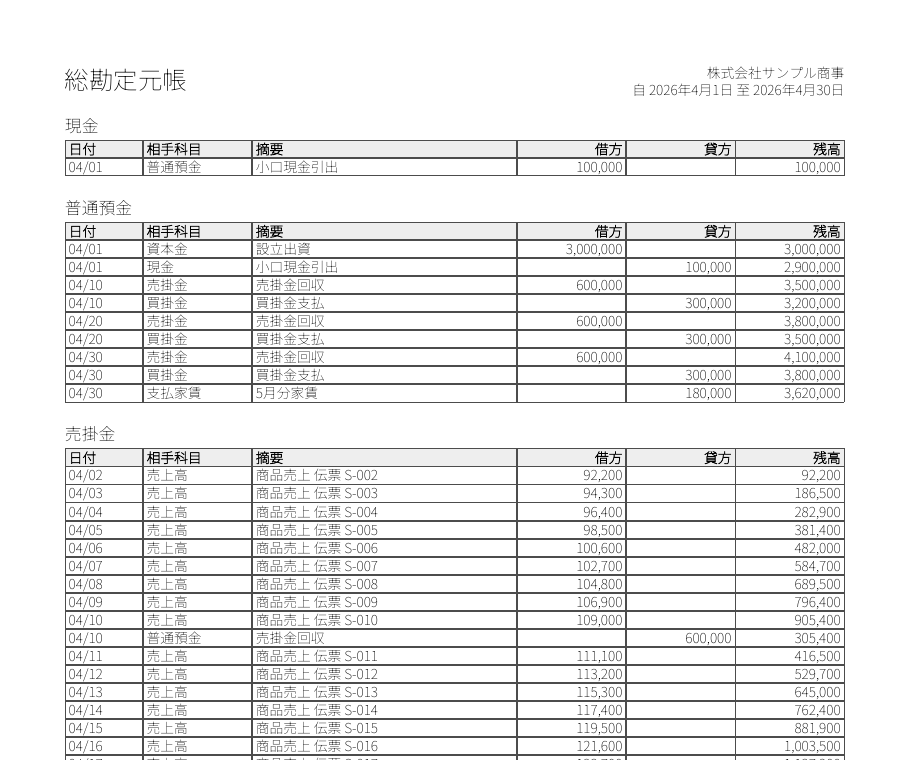
}go run . writes journal.pdf, ledger.pdf, and trial_balance.pdf. This is the first page of the general ledger.
The journal: set widths and alignment
The journal is the simplest of the three. Each entry becomes one row, and a totals row goes at the end.
table(c, []string{"日付", "借方科目", "借方金額", "貸方科目", "貸方金額", "摘要"}, rows,
[]float64{10, 14, 14, 14, 14, 34}, []document.TextAlign{L, L, R, L, R, L})Two things are specified. template.ColumnWidths takes the widths as percentages that add up to 100. template.ColumnAlign takes one alignment per column: right for amounts, left for everything else. ColumnAlign applies to the header row too, so the heading sits right-aligned above its numbers.
Thousands separators are added by the yen function before the value reaches the table. gpdf has no number formatting. c.Table takes a [][]string, and formatting each cell is the caller's job. Zero becomes an empty string because in the ledger, a row with a debit amount should have a blank credit cell. A report full of printed 0s is hard to read.
The totals row puts the same total under debit and credit. With one-to-one entries that is true by definition. If you extend this to compound entries, sum the two sides separately.
The general ledger: posting and running balances
The ledger is the journal posted to accounts. If an entry debits accounts receivable and credits sales, it appears once in the debit column of the receivables ledger and once in the credit column of the sales ledger. That is why 67 entries become 134 ledger rows.
The code scans every entry for each account.
switch acct {
case e.Debit:
dr, counter = e.Amount, e.Credit
case e.Credit:
cr, counter = e.Amount, e.Debit
default:
continue
}If the account is on the debit side, the amount goes in the debit column and the credit account is recorded as the contra account. If it is on the credit side, the reverse. Otherwise the entry is skipped.
This is an accounts × entries loop, and 8 × 67 is nothing. At 300 accounts and 100,000 entries, bucket the entries into a map[string][]Entry first. At that size the aggregation is probably done in SQL anyway, and Go receives rows already grouped by account.
The balance column uses debitSide to decide the direction.
if debitSide[acct] {
bal += dr - cr
} else {
bal += cr - dr
}Bank deposits is a debit-normal account, so it goes up on deposits (debit) and down on payments (credit). Accounts payable is credit-normal, so it is the opposite. Leave this branch out and you get a payables ledger whose balance grows more and more negative. The numbers are arithmetically correct and the accounting team will still send it back, which makes it one of the harder bugs to explain.
As an aside, there is no logical reason debit is on the left and credit is on the right. It is a convention that has survived since double-entry bookkeeping took shape in 15th-century Italy, and you have to memorize it. The words themselves do not help either: "debit" and "credit" describe the other party's position, which is the reverse of what most beginners expect. Naming the variables dr and cr at least keeps the code from adding to the confusion.
On the layout side, each account adds one page.AutoRow.
page.AutoRow(func(r *template.RowBuilder) {
	r.Col(12, func(c *template.ColBuilder) {
		c.Text(acct, template.FontSize(11))
		c.Spacer(document.Mm(1))
		table(c, /* ... */)
		c.Spacer(document.Mm(5))
	})
})
Account name, table, spacing, stacked eight times. Nothing in this code calculates where a page ends.
The trial balance: fail before rendering
The trial balance shows total debits and total credits per account, and puts the difference on whichever side it falls. By convention the account name is in the middle with debits on the left and credits on the right, so the columns are debit balance, debit total, account, credit total, credit balance.
The most important lines for this report come before the table is drawn.
if sumDr != sumCr || balDr != balCr {
	log.Fatalf("out of balance: totals %d/%d balances %d/%d", sumDr, sumCr, balDr, balCr)
}
A trial balance exists to catch posting errors. If total debits and total credits disagree, an entry is broken somewhere. There is no point typesetting an out-of-balance PDF nicely. Stop instead.
In the sample data the totals are 11,269,600 yen and the balances are 7,389,600 yen, and both sides agree. With only one-to-one entries they have to. These three lines start to matter the moment the data comes from a database. In production, return an error instead of calling log.Fatalf, so you can find out which account is off.
Page breaks: nothing to do
The code above has no page-break logic. It does not count rows and does not look at the remaining height.
When a table does not fit in the remaining space, gpdf's layout engine splits the body and redraws the header row at the top of the next page. Page 2 of the journal starts with the header row, and so does the continuation of the receivables table in the ledger. The report title and period in doc.Header and the page number in doc.Footer appear on every page. How do I make a table span multiple pages? explains the mechanism.
The page number is two placeholders inside an ordinary string.
c.Text(document.PageNumberPlaceholder+" / "+document.TotalPagesPlaceholder, ...)The total is filled in after pagination finishes. See How do I show "Page X of Y" in the footer?.
Measurements
These numbers are for the journal only, using generated sales entries at different counts. Apple M1, Go 1.25.2, gpdf v1.0.17. Time runs from having the font bytes in memory to the PDF being written to disk.
| Entries | Pages | Time | File size |
|---|---|---|---|
| 68 | 2 | 8.8 ms | 146 KB |
| 1,000 | 17 | 68 ms | 1.9 MB |
| 10,000 | 170 | ~0.7 s | 19 MB |
8.8 ms for 68 entries looks slow next to gpdf's benchmark figure of 13 µs for a single page. Most of that time is the font: Noto Sans JP is a 9.6 MB TTF, and it is parsed and subset on every run. Beyond that, each additional row costs around 70 µs and the growth is linear. For a nightly batch that produces monthly reports for a whole company, the database query will be the bottleneck before PDF generation is.
The file size deserves a plain statement. Each page is about 115 KB. gpdf v1.0.17 compresses font and image streams but not the page drawing operators, and a report with a border on every cell has a lot of operators. 19 MB for 10,000 rows is too large for an email attachment. Splitting by month, or dropping the grid in favor of template.TableStripe zebra rows, are the practical ways around it.
What we gave up
Cell padding. c.Table in v1.0.17 has no option for padding inside a cell. With cell borders, the text touches the line. The sample's table function adds one space on the aligned side of each cell. It is not pretty, and it works. With zebra stripes instead of borders the problem does not come up.
Page subtotals and carried-forward rows. Paper ledgers traditionally end each page with a "carried forward" row and start the next with "brought forward". To do that, the aggregation code has to know which rows land on which page. gpdf decides page breaks at layout time, so the builder API cannot tell you. You can fix the number of rows per page and break pages yourself, but that means giving up automatic pagination. We have not found a good way to do this yet.
Legal requirements. This code produces PDFs that look like books of account. Whether they meet your jurisdiction's record-keeping rules is a separate question. In Japan, for example, books created in an accounting system are generally retained as data under the Electronic Books Preservation Act, and the PDF is an output for viewing or submission. Check with the National Tax Agency guidance (Japanese) or your accountant.
FAQ
Do I need a reporting tool to produce accounting PDFs in Go?
Not for table-driven reports such as a journal, ledger, or trial balance. Pass a [][]string to gpdf's c.Table and you get borders, column widths, right alignment, automatic page breaks, and repeated header rows. gpdf is MIT-licensed with zero external dependencies, so there is no runtime license either.
Can I use landscape orientation?
Yes. Change the option to template.WithPageSize(document.A4.Landscape()). A journal with long memos reads better in landscape. Column widths are percentages, so nothing else in the code changes.
Does it work with non-Japanese text?
Yes. Replace the strings and register a font that covers your script with template.WithFont. For Japanese, Noto Sans JP, IPAex Gothic, and Source Han Sans all work the same way. See How do I embed a Japanese font in gpdf?.
Can negative amounts be shown in red or in parentheses?
Parentheses or a minus sign are a string-formatting matter, so handle them in yen. c.Table has no per-cell text color option. For red figures, build a document.Table directly, as described in Tables in Go PDFs.
Can I output PDF/A for long-term archiving?
Yes. Pass gpdf.WithPDFA() to gpdf.NewDocument. PDF/A requires embedded fonts, which a CJK report already has.
Try gpdf
gpdf is a Go library for generating PDFs. MIT licensed, zero external dependencies, native CJK support.
go get github.com/gpdf-dev/gpdf⭐ Star on GitHub · Read the docs
Next reads
- Tables in Go PDFs: column widths, striped rows, page breaks — every
c.Tableoption, and when to drop down todocument.Table. - Generate an invoice PDF in Go in under 50 lines — the one-page document that comes before reports.
- The definitive guide to Japanese PDFs in Go — font selection through tofu fixes.
If you work out a clean way to do carried-forward rows, open an issue on GitHub.